TL;DR
The traditional rule that building is always cheaper no longer applies in 2026. Prebuilt AI workstations can match or beat DIY costs due to component shortages and bulk buying. Your choice depends on your need for control, speed, and support, not just initial price.
Imagine walking into a store and grabbing a high-end AI workstation ready to go, or spending months sourcing parts, assembling, and tuning your own. The game has changed. The old idea that building your own machine is always cheaper no longer holds true in 2026. Prices for GPUs, RAM, and SSDs have skyrocketed due to shortages, making prebuilt systems more competitive.
Whether you’re a researcher, startup, or hobbyist, this choice impacts your speed to deployment, control over specs, and ongoing support. This article shows you exactly when to buy, when to build, and how the decision really breaks down today.
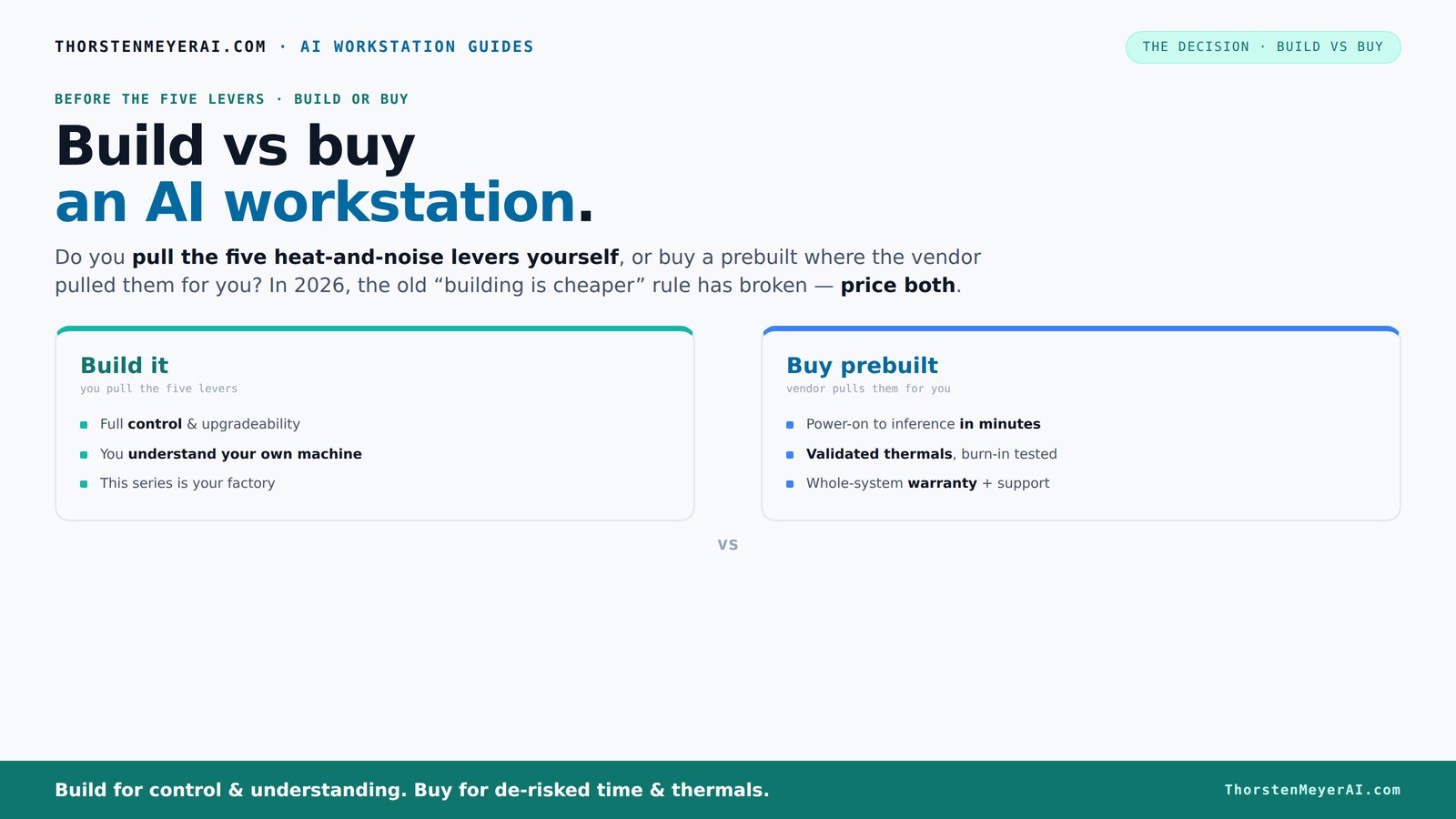
Build vs buy
an AI workstation.
The real question behind this whole series: do you pull the five heat-and-noise levers yourself, or buy a prebuilt where the vendor pulled them for you? And in 2026, the old “building is cheaper” rule has broken. Match your situation in Part 3.
Key Takeaways
- Component shortages and bulk buying in 2026 make prebuilt AI workstations often cheaper or comparable in cost to DIY builds.
- Prebuilts save time, reduce troubleshooting, and include validated thermals and warranties, making them ideal for quick deployment.
- Building your own rig offers precise control over hardware, cooling, and noise, but comes with hidden costs and risks.
- Most AI teams and organizations benefit from a hybrid approach: buy the baseline and upgrade selectively.
- Always compare total costs and support options for your specific workload before deciding.

CLX Horus Gaming PC - Intel Core Ultra 9 285K 3.7GHz, GeForce RTX 5080, 2TB SSD, 32GB DDR5 RGB Memory, 360mm AIO, WiFi, Windows 11 Home, White, AI-Accelerated
- High-Performance CPU: Intel Core Ultra 9 285K, 24 cores, 5.70GHz
- Advanced Graphics Card: GeForce RTX 5080, 16GB GDDR7
- Fast Memory and Storage: 32GB DDR5 RAM, 2TB SSD
As an affiliate, we earn on qualifying purchases.
As an affiliate, we earn on qualifying purchases.
Why the 'Build Is Always Cheaper' Myth Is Dead in 2026
Building your own AI workstation used to be a clear win on cost. Today, the prices for key parts like GPUs and DDR5 RAM have spiked by 30-50% since 2024, thanks to chip shortages and demand surges. A rig that cost $1,200 in 2024 now easily hits $1,500 or more, without even factoring in labor or time.
Meanwhile, big vendors like Lambda or Puget Systems snapped up components early at lower prices, allowing them to offer systems that match or beat DIY prices. This shift means that, while building might seem cheaper initially, the actual costs—considering time, troubleshooting, and market fluctuations—often favor prebuilt options. The implication is that cost comparisons need to be more nuanced, factoring in the hidden expenses of DIY, such as time investment and potential delays. The tradeoff is clear: DIY might still appeal for customization, but economically, prebuilt systems have become a more practical choice for many.
**Practical takeaway:** Before deciding, get current price quotes for the exact components you need. Factor in your own time and potential troubleshooting costs. Use online calculators or spreadsheets to compare total project costs over a realistic timeline, including support and warranty considerations. This way, you can make an informed decision based on real-time data rather than outdated assumptions.
Who Pulls the Levers? Building vs Buying for Heat, Noise, and Performance
Building your own AI workstation means you control every detail — from undervolting GPUs to choosing the quietest case fans. This level of control allows you to optimize for specific needs, such as ultra-quiet operation or maximum thermal performance. The tradeoff is that this process requires deep knowledge and time investment; tuning thermals and acoustics can be complex and sometimes frustrating, especially when balancing cooling efficiency with noise levels. Poor thermal management can lead to throttling, reduced lifespan, or system instability, which might negate performance gains you aimed for. Moreover, the risk of miscalculations increases if you lack experience, leading to costly errors.
Buying a prebuilt shifts that control to the vendor. Reputable companies like BIZON or Lambda validate thermals, tune fans, and often include water-cooling for quieter operation. They run burn-in tests to ensure your system won’t throttle under load, saving you hours of tinkering. This approach offers peace of mind that the system is optimized for stability and noise levels, but at the expense of some customization. **Practical guidance:** When choosing between build and buy, consider your performance priorities. If noise and thermal control are critical, list your must-have features and ask vendors if their prebuilt systems meet these specs. For DIY, create a checklist of your thermal and acoustic goals, then research components known for quiet operation and efficient cooling. Use online forums and reviews to identify common pitfalls and best practices. This targeted approach helps you select or build a system aligned with your performance and noise requirements, reducing trial-and-error and ensuring your environment stays stable and quiet.
When a Prebuilt AI Workstation Saves You Time and Hassle
If you need a ready-to-run system, buying prebuilt is a no-brainer. It arrives with the OS, CUDA, TensorFlow, and Docker preinstalled. You power it on and start training or inference within hours, which is crucial when project deadlines are tight or when rapid deployment is essential. This streamlined setup reduces the risk of configuration errors that can occur during manual software installation and driver updates, which can be especially problematic with hardware from different vendors or new architectures.
For busy professionals or teams, that means faster time-to-value. No waiting for parts, no BIOS updates, no driver conflicts. Plus, the vendor’s warranty covers hardware failures and thermal management — no surprise bills or troubleshooting delays. **Action step:** To maximize this advantage, prepare a clear list of your software dependencies and performance requirements before purchase. Confirm with the vendor that their system includes or supports these. Once received, run a quick validation test to ensure all components perform as expected. This proactive check helps you avoid surprises and accelerates your project start, especially when time is critical.
The broader implication is that, in environments where time is critical, prebuilt systems significantly reduce operational risk and accelerate project timelines, leading to better productivity and quicker ROI. **Practical tip:** Keep documentation of your system configuration and any custom settings. This makes future troubleshooting or upgrades smoother, saving you time down the line.
Cost Breakdown: Building vs Buying in 2026
| Factor | Building | Buying |
|---|---|---|
| Hardware Cost | Often higher now due to component shortages. Expect $1,250+ for a decent AI rig, with prices fluctuating based on availability and market demand. | Comparable or lower, thanks to bulk buying and vendor discounts, which leverage economies of scale to reduce final costs. |
| Labor & Time | Hours to months depending on experience and procurement delays. The time spent troubleshooting, assembling, and tuning can add up, sometimes exceeding monetary costs. | Minutes to days — just unpack and power on. The time saved can be critical for project deadlines or scaling efforts. |
| Support & Warranty | Buyer handles troubleshooting; no warranty on custom parts, which can lead to unexpected repair costs. DIY support depends on individual expertise, risking longer downtimes. | Vendor provides support, burn-in validation, and warranties up to 5 years. This reduces downtime and provides peace of mind, especially for mission-critical applications. |
| Upgrades & Maintenance | Flexible but labor-intensive. You handle upgrades, which can be costly and time-consuming, especially if hardware becomes obsolete or incompatible. | Limited but supported; upgrades often involve vendor support, ensuring compatibility and reducing risk of system instability. This tradeoff favors stability over maximum customization. |
**Practical action:** Create a detailed cost comparison worksheet that includes current component prices, estimated build time, and support costs. Use this to simulate different scenarios—e.g., upgrading GPUs in 2 years—so you can see which option offers better long-term value based on your specific workload and upgrade plans.
Who Should Build Their Own? When Is It Worth the Effort?
If your project demands ultra-specific hardware, like a unique GPU setup or custom cooling, building is the way to go. It allows you to tailor every component to your exact needs, potentially unlocking performance gains or cost savings in niche configurations. For example, if you require a specialized cooling solution for overclocking or proprietary hardware integration, building gives you the flexibility to engineer a system that precisely matches your specifications. Additionally, if you enjoy the process of hardware assembly, troubleshooting, and optimization—perhaps as a hobbyist or researcher—DIY can be rewarding beyond just the technical benefits.
**Practical guidance:** Before embarking on a build, define your exact hardware needs based on your workload. Use this list to research components with proven compatibility and performance. Consult online communities and vendor support to identify common pitfalls and best practices. Implement a step-by-step project plan, including testing phases, to avoid costly mistakes. This structured approach ensures your effort yields a reliable, high-performance system tailored to your demands.
When Buying Is the Smarter Move for Most AI Teams
Most organizations prioritize speed, reliability, and ongoing support. For them, prebuilt systems are a huge time-saver because they are designed with validated thermals, robust cooling, and comprehensive warranties. This reduces operational downtime and troubleshooting, enabling teams to focus on their core AI work rather than system maintenance. Furthermore, the consistency of prebuilt systems ensures predictable performance, which is critical for scaling projects or deploying multiple nodes efficiently.
**Practical step:** For teams planning rapid expansion or deploying multiple systems, develop a standard procurement checklist that includes vendor support, warranty coverage, and scalability features. Use this checklist to evaluate prebuilt options against custom builds. This ensures your decision aligns with operational needs, minimizes hidden costs, and supports smooth scaling without unexpected delays or compatibility issues.
For example, a startup needing to quickly spin up multiple nodes for distributed training will find that buying prebuilt systems minimizes delays caused by sourcing parts, assembly, and testing. It also simplifies inventory management and supports rapid scaling. The broader implication is that, in 2026, the economies of scale and vendor support make prebuilt solutions not only more convenient but often more cost-effective for most AI teams, especially when time and reliability are paramount.
Future-Proofing Your Investment: Upgradeability and Scalability
Building your own machine can give you a clear upgrade path—more RAM, new GPUs, faster storage—if you plan carefully. You control the expansion, making it easier to adapt to evolving workloads or incorporate new technologies. However, the tradeoff is that high-density, tightly packed configurations typical of prebuilt systems often limit future upgrades because of space constraints or proprietary design choices. Some vendors now design for future expansion, supporting the latest GPUs and faster interfaces, but these are exceptions rather than the rule. When planning your system, consider whether your workload is likely to require frequent upgrades or scaling—if yes, building might be preferable. For most, a hybrid approach—buy the base system and upgrade key components over time—strikes a balance between flexibility and convenience.
**Practical action:** When designing or selecting a system, map out your anticipated upgrade needs over the next 2-3 years. Use this plan to evaluate whether your chosen approach allows for smooth upgrades without costly redesigns. For DIY builds, select modular components and standard interfaces. For prebuilt, ask vendors about future expansion options and upgrade support. Documenting your upgrade roadmap helps prevent bottlenecks and ensures your system remains relevant as your workload evolves.
The Hidden Pitfalls of Building Your Own AI Workstation
Building sounds fun, but it’s easy to underestimate the complexities involved. Inadequate cooling solutions can lead to thermal throttling, reducing performance and risking hardware damage. A misjudged power supply might cause system instability or component failures, especially with high-power GPUs. Driver compatibility issues, particularly with bleeding-edge hardware, can result in frustrating troubleshooting sessions that eat into your project timeline. Additionally, if you overlook VRAM requirements or fail to properly tune BIOS and fan curves, you risk limiting your system’s performance or experiencing frequent crashes during intensive tasks. These hidden costs—time spent troubleshooting, hardware replacements, or thermal management—can outweigh initial savings, especially if you’re working under tight deadlines or lack extensive experience.
**Practical advice:** Before starting a build, create a detailed plan that includes chosen components, thermal solutions, and compatibility checks. Use online resources and community feedback to identify common issues and best practices. Allocate extra time for testing and fine-tuning your system before deploying it for critical workloads. Regular maintenance and monitoring post-build can prevent minor issues from becoming costly failures. Recognizing these potential pitfalls and preparing accordingly can save you time and money, ensuring your DIY system performs reliably from day one.
How to Decide: Build, Buy, or Hybrid?
- Assess your workload: Is it training, inference, or both? Understanding your primary tasks helps determine the hardware flexibility and performance you need.
- Estimate your budget, factoring in support and downtime. Consider not just initial costs but also long-term expenses related to maintenance and upgrades.
- Consider your timeline: Do you need fast deployment to meet deadlines, or can you afford a longer build process? This influences whether prebuilt or custom solutions are more practical.
- Evaluate your technical skills and available time. If you lack experience or resources, a prebuilt system minimizes risk and effort.
- Compare the total costs now, including potential upgrade paths and support options. Think about future scalability and how each option aligns with your growth plans.
**Practical decision framework:** Create a decision matrix that weighs factors such as upfront cost, time to deployment, customization needs, upgradeability, and support. Assign scores to each factor based on your priorities. Use this matrix to objectively compare options, guiding you toward the best choice aligned with your project goals and resources.
Frequently Asked Questions
Is it cheaper to build or buy a prebuilt AI workstation?
In 2026, due to component shortages and bulk purchasing, prebuilt systems often cost the same or less than building your own, especially when factoring in labor and troubleshooting time.How long does it take to deploy a prebuilt system versus building one?
A prebuilt arrives ready to run within days, while building from scratch can take weeks to months, depending on your experience, procurement delays, and tuning.What workloads justify building my own AI workstation?
Building makes sense if you need custom hardware, specific cooling solutions, or proprietary configurations. Otherwise, most teams benefit from buying a validated system for reliability and speed.Can a prebuilt handle multi-GPU training and inference?
Yes, reputable vendors design their systems for multi-GPU workloads, with validated cooling and power delivery, reducing the risk of throttling or failure.What are the hidden costs of building my own AI workstation?
Hidden costs include thermal management, power supply adequacy, driver troubleshooting, and potential downtime during tuning. These often outweigh initial savings.Conclusion
The choice between build and buy hinges on your needs for speed, control, and long-term support. For most, the smarter move in 2026 is to buy a validated, ready-to-run AI workstation that minimizes downtime and surprises. Building makes sense only if you have specific hardware demands or enjoy the process.
In this era of supply chain shocks and component scarcity, prioritize what saves you time and risk. Your AI projects will thank you with faster results and less hassle.