
The best playful tech accessories add personality to a desk while still doing a useful job. My best overall pick is the Divoom MiniToo, which pairs a retro-computer look and pixel display with Bluetooth audio; the Divoom TimeBox Evo is a more compact speaker-and-display choice, while the 32×32 LED Pixel Art Display suits buyers who care most about customizable visuals. The main tradeoff is whether you want an accessory that earns its space through everyday utility or one that mainly brings visual fun. Size, setup needs, and how often you’ll use its extra features matter as much as its design. Read on for the full breakdown and help matching each option to your desk and habits.

Get your wardrobe favorites delivered free with Prime
- Fast, free delivery on millions of items
- Prime Video, Amazon Music and more included
- Member-only deals all year
Key Takeaways
- Dual-purpose designs lead the roundup: The MiniToo and TimeBox Evo combine pixel-art personality with Bluetooth speaker functions, while a standalone display depends more on your interest in changing visuals.
- Pixel-display size changes the experience: The 32×32 LED display offers more room for artwork than the TimeBox Evo’s 16×16 panel, but a larger visual canvas may take more desk space.
- Retro styling comes in different forms: The MiniToo, Maclock, and Tiivoo-2 borrow from classic computer design, but they serve different needs: audio and visuals, timekeeping, or a speaker with FM radio.
- Not every playful pick needs to be a screen: The cat-tail headphone hook and gamer-chair phone stand add character through simple organization, without asking you to manage an app or display.
- Novelty features bring fit tradeoffs: The levitating speaker and rechargeable clicker keychain stand out for unusual interaction, but buyers should put their practical needs, placement, and charging habits ahead of novelty alone.
| Divoom MiniToo Retro PC-Style Bluetooth Speaker with Pixel Display |  | Best Compact Desk Companion | Brand: Divoom | Model: MiniToo | Audio output: Mono | VIEW LATEST PRICE | See Our Full Breakdown |
| 32×32 LED Pixel Art Display with App Control | 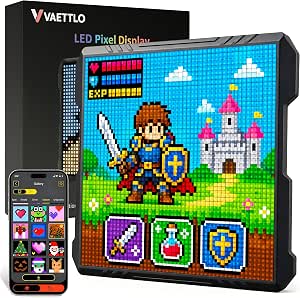 | Best for Custom Pixel Art | Display: 32×32 pixels | Control: Mobile app | Power: USB wired | VIEW LATEST PRICE | See Our Full Breakdown |
| VELENTI Gamer Chair Phone Stand for Smartphones and Kindles |  | Best Playful Phone Stand | Brand: VELENTI | Style: Gamer chair | Color: Black | VIEW LATEST PRICE | See Our Full Breakdown |
| Cute Cat Tail Headphone Hook – White |  | Best Space-Saving Desk Organizer | Material: ABS plastic | Color: White | Dimensions: 3.3 × 1.26 × 0.2 inches | VIEW LATEST PRICE | See Our Full Breakdown |
| Divoom TimeBox Evo Bluetooth Speaker with 16×16 Pixel Art LED Display, Black |  | Best Feature-Rich Pixel Speaker | Brand: Divoom | Model: Timebox-Evo | Speaker power: 6W | VIEW LATEST PRICE | See Our Full Breakdown |
| Maclock Retro Computer-Inspired Desk Clock with Pixel Display |  | Best Playful Desk Clock | Display: Digital pixel LCD | Functions: Time, date, room temperature, and alarm | Alarm schedules: 5 flexible options | VIEW LATEST PRICE | See Our Full Breakdown |
| Divoom Pixoo LED Pixel Display Panel |  | Best for Custom Pixel Art | Model: Pixoo (PX001) | Display grid: 16 × 16 pixels | Light source: 300 LED light sources | VIEW LATEST PRICE | See Our Full Breakdown |
| Magnetic Levitation Bluetooth Speaker |  | Best Floating Desk Showpiece | Audio output: 360° levitation speaker | Bluetooth: Version 5.1; 10-meter range | Driver: 2.25 inches | VIEW LATEST PRICE | See Our Full Breakdown |
| Rechargeable Lizard Mechanical Switch Clicker Keychain with LED |  | Best Pocket Fidget | Material: ABS | Power: Rechargeable built-in battery | Charging: USB-C cable included | VIEW LATEST PRICE | See Our Full Breakdown |
| Divoom Tiivoo-2 Retro Bluetooth Speaker with FM Radio and Pixel Art Display, Cream |  | Best All-in-One Retro Companion | Model and color: Tiivoo-2, cream | Audio: Stereo; 4.2 W maximum output | Speaker size: 2.92 inches | VIEW LATEST PRICE | See Our Full Breakdown |
| playful tech accessorie | Power |
|---|---|
| Divoom MiniToo Retro PC-Style | — |
| 32×32 LED Pixel Art Display wi | USB wired |
| VELENTI Gamer Chair Phone Stan | — |
| Cute Cat Tail Headphone Hook | — |
| Divoom TimeBox Evo Bluetooth S | — |
| Maclock Retro Computer-Inspire | Rechargeable battery |
| Divoom Pixoo LED Pixel Display | Battery powered |
| Magnetic Levitation Bluetooth | — |
| Rechargeable Lizard Mechanical | Rechargeable built-in battery |
| Divoom Tiivoo-2 Retro Bluetoot | Battery powered; one lithium-ion battery included |
More Details on Our Top Picks
Divoom MiniToo Retro PC-Style Bluetooth Speaker with Pixel Display
The Divoom MiniToo combines a small speaker with a customizable pixel screen, so it adds personality without taking much desk space. Its 1.77-inch display can show animations, messages, and clock faces, while the alarm, white noise, and Pomodoro timer give it jobs beyond playing music. Compared with the Divoom TimeBox Evo, the MiniToo is smaller and more suited to a tight workspace, but its 5W mono output is a more modest audio setup than the TimeBox Evo’s 6W stereo speaker. Bluetooth 5.3, USB audio, and TF card playback offer several ways to listen. The tradeoff is a plastic enclosure and mono sound, making this a desk accessory first and a room-filling speaker second.
Pros:- Customizable pixel display adds animations, messages, and clock faces to a small desk setup.
- Alarm, white noise, and Pomodoro timer add practical daily functions.
- Bluetooth 5.3, USB audio, and TF card playback provide flexible listening options.
- Compact 1.87 × 1.6 × 3.06-inch tabletop footprint.
Cons:- 5W mono audio is less suited to spacious or room-filling listening than the TimeBox Evo.
- Plastic enclosure lacks the more substantial feel some buyers may want.
Best for: Desk users who want a compact pixel-art speaker that can also handle focus timers, alarms, and background sound.
Not ideal for: Listeners seeking stereo separation or fuller sound for a shared room; the MiniToo has 5W mono output.
- Brand:Divoom
- Model:MiniToo
- Audio output:Mono
- Maximum output power:5 watts
- Display:1.77-inch pixel screen
- Connectivity:Bluetooth 5.3, USB, TF card
- Dimensions:1.87 × 1.6 × 3.06 inches
- Weight:201.8 g
- Enclosure material:Plastic
Our verdict“Choose the MiniToo for a small, multifunctional pixel-art desk speaker, not for stereo-focused listening.”
32×32 LED Pixel Art Display with App Control
This 32×32 LED display is the clearest pick here for buyers who want pixel visuals rather than a speaker with a screen attached. The mobile app supports custom art, text, animations, and clock modes, and the display can sit on a desk or mount on a wall. Compared with the Divoom MiniToo, it gives pixel creations more room to read, but it has no audio or built-in timer features. Its USB wired power suits a fixed workstation or wall display and avoids battery charging; the catch is that it needs to stay near a power connection. Customization also depends on the dedicated app, so buyers who want a simple, self-contained decorative display may prefer a less app-dependent accessory.
Pros:- 32×32 resolution gives custom art and text more display area than the MiniToo’s small screen.
- App supports pixel art, editable text, animations, and clock modes.
- Tabletop or wall-mount placement offers flexible setup options.
- USB wired power supports extended use without battery charging.
Cons:- Requires a USB power connection and cannot run on a built-in battery.
- Customization relies on the dedicated mobile app.
- Provides visual decoration but no speaker or other described utility features.
Best for: Pixel-art fans and desk decorators who want a larger customizable display for animations, messages, and clock modes near a USB power source.
Not ideal for: People who need a portable display, prefer not to use a companion app, or want audio features in their playful tech accessory.
- Display:32×32 pixels
- Control:Mobile app
- Power:USB wired
- Mounting:Tabletop or wall mount
- Material:ABS
- Color:Black
- Dimensions:5.81 × 5.55 inches
- Light type:LED
Our verdict“Pick this display if customizable pixel visuals matter more than portability, sound, or app-free operation.”
VELENTI Gamer Chair Phone Stand for Smartphones and Kindles
Shaped like a gaming chair, this VELENTI stand gives a phone or Kindle a visible place on a desk without adding another screen or powered gadget. Its small, lightweight format makes it easy to move between a gaming setup and a bedside table, while the distinctive chair design brings more character than the minimal Cat Tail Headphone Hook. The stand is a straightforward accessory rather than an interactive one: there are no lights, controls, or connectivity features listed. Check device fit before buying, since it is designed for devices up to 19 cm tall, and the clip-style holder may not suit every shape. Its biodegradable materials are a plus for buyers who value material choices, though the narrow compatibility makes it less flexible than a general-purpose desk display.
Pros:- Gaming-chair shape adds a playful detail to a desk or gaming setup.
- Keeps a compatible smartphone or Kindle visible and within reach.
- Lightweight 0.08 kg design is easy to reposition.
- Made from eco-friendly, biodegradable materials.
Cons:- Limited to devices up to 19 cm tall.
- Clip-style holder may not fit every device shape or case.
- Offers a simple holding function rather than the display or audio features of the Divoom MiniToo.
Best for: Gamers and Kindle readers who want a lightweight, characterful tabletop holder for a compatible device up to 19 cm tall.
Not ideal for: Owners of larger devices or unusually shaped cases, since the stand has a 19 cm height limit and its clip-style fit may not work for every device.
- Brand:VELENTI
- Style:Gamer chair
- Color:Black
- Mounting type:Tabletop
- Compatible devices:Smartphones, Kindles
- Maximum device height:19 cm
- Material:Eco-friendly, biodegradable materials
- Item weight:0.08 kg
Our verdict“Choose this stand for a compatible phone or Kindle when playful desk styling matters more than adjustability or added tech features.”
Cute Cat Tail Headphone Hook – White
The Cat Tail Headphone Hook turns a small patch of monitor or desk surface into a spot for headphones, keys, or glasses, with a curled-tail shape that makes basic organization feel more playful. Unlike the VELENTI Gamer Chair Phone Stand, it does not hold a screen; its value is keeping small accessories off the work surface and easy to reach. The adhesive mounting avoids taking up desk space, but also makes placement less forgiving than a freestanding accessory. The hook is rated for up to 500 g only after its adhesive cures for 24 hours, and the product notes that residue or surface preparation may be an issue. Larger over-ear headphones may exceed its practical capacity, so check both the load and mounting surface before choosing it.
Pros:- Cat-tail shape adds a whimsical touch to monitor or desk organization.
- Adhesive mounting keeps the hook from occupying desk surface area.
- Can hold headphones, keys, glasses, and other small accessories.
- ABS plastic construction and a stated 500 g maximum load.
Cons:- Adhesive needs 24 hours to cure before reaching full stated strength.
- Removal may leave residue, and mounting depends on a suitable surface.
- The 500 g limit may not suit larger or heavier headphones.
Best for: Desk users with lightweight headphones or small everyday items who want a compact, decorative hook and have a suitable adhesive surface.
Not ideal for: People with heavy over-ear headphones, delicate surfaces where adhesive residue is a concern, or anyone who needs an immediately load-ready mount.
- Material:ABS plastic
- Color:White
- Dimensions:3.3 × 1.26 × 0.2 inches
- Weight:1.6 ounces
- Maximum load:500 g (1.1 lbs)
- Mounting type:Adhesive
Our verdict“Choose this hook for lightweight accessories and a playful, space-saving setup, provided the adhesive and load limits suit your surface and headphones.”
Divoom TimeBox Evo Bluetooth Speaker with 16×16 Pixel Art LED Display, Black
The Divoom TimeBox Evo is the strongest choice here for buyers who want a playful pixel display alongside a broader set of speaker and desk functions. Its 16×16 full-color screen supports customizable art, while alarm, planner, calendar, stopwatch, and scorekeeping features make it more than a decorative screen. Compared with the smaller Divoom MiniToo, it offers 6W stereo output and app plus touch controls, but takes a more feature-heavy approach than the MiniToo’s compact, 5W mono design. Bluetooth and wired connectivity give it listening flexibility. The tradeoffs are a plastic enclosure and no waterproofing, so it is better suited to a desk or dry indoor setting than a bathroom, kitchen splash zone, or outdoor use.
Pros:- Customizable full-color 16×16 pixel display adds playful visual personalization.
- 6W stereo speaker offers a more substantial audio setup than the MiniToo’s 5W mono output.
- Alarm, planner, calendar, stopwatch, and scorekeeping functions extend its desk utility.
- Bluetooth and wired connectivity, with app and touch controls.
Cons:- Not waterproof, limiting use around sinks, showers, or outdoor conditions.
- Plastic enclosure may feel less substantial than buyers seeking a more premium material.
- More features and functions may be unnecessary for shoppers who only want a simple pixel display.
Best for: Buyers who want one desk accessory for customizable pixel art, stereo Bluetooth audio, and multiple planning or timing tools.
Not ideal for: People seeking a water-resistant speaker, or those who prefer a smaller, simpler device like the Divoom MiniToo.
- Brand:Divoom
- Model:Timebox-Evo
- Speaker power:6W
- Display:16×16 full RGB LED
- Audio output mode:Stereo
- Connectivity:Bluetooth, wired
- Bluetooth range:10 meters
- Control method:App, touch
- Waterproof:No
Our verdict“Choose the TimeBox Evo for a feature-rich desk speaker with stereo sound and pixel art, but keep it in a dry setting.”
Maclock Retro Computer-Inspired Desk Clock with Pixel Display
The Maclock makes the most sense for someone who wants a nostalgic desk accessory that earns its space with everyday information. Its pixel LCD shows time, date, and room temperature, while five alarm schedules and adjustable warm backlighting add practical clock functions. The included floppy disk and stickers lean into the vintage-computer look more directly than the animation-focused Divoom Pixoo, which is better for displaying custom pixel art. Maclock is also rechargeable and compact enough to move around a desk or bedside table. The tradeoff is that its temperature display pauses while the backlight is on, and the screen size is unspecified. Choose it for a clock with character, not for a large, highly detailed display.
Pros:- Shows time, date, and room temperature on one pixel display.
- Five alarm schedules suit changing routines.
- Rechargeable design and included USB-C cable make it easy to reposition.
- Decorative floppy disk and stickers reinforce its vintage-computer style.
Cons:- Temperature updates pause while the backlight is on.
- Unspecified screen size makes display legibility difficult to judge.
- Its clock-focused display offers less creative animation control than the Divoom Pixoo.
Best for: Retro-computer fans who want a compact bedside or desk clock with alarms, date, and temperature information.
Not ideal for: Buyers who want animated custom artwork or need temperature readings to update continuously while the display is lit.
- Display:Digital pixel LCD
- Functions:Time, date, room temperature, and alarm
- Alarm schedules:5 flexible options
- Brightness:Adjustable warm backlighting
- Power:Rechargeable battery
- Mounting:Tabletop
- Materials:ABS and PMMA
- Dimensions:3.1 in W × 4.2 in H
- Included accessories:Decorative floppy disk, vintage stickers, and USB-C cable
Our verdict“Pick the Maclock if you want a rechargeable retro-style clock with useful daily functions rather than a customizable pixel-art panel.”
Divoom Pixoo LED Pixel Display Panel
The Divoom Pixoo is the clearest pick here for buyers who want their desk accessory to show off artwork rather than serve mainly as a clock or speaker. Its 16 × 16 RGB grid displays colorful animations, and the app lets you draw, upload animations, or sync lighting with music. That makes it more creatively focused than the Maclock, which centers on time and temperature, and more dedicated to visuals than the multifunction Divoom Tiivoo-2. The compact square form fits a desk or shelf without taking over the setup. The tradeoff is resolution: the coarse grid limits fine detail, and battery-powered operation means availability depends on its battery setup. Choose Pixoo for bold, simple pixel graphics, not intricate images.
Pros:- App supports custom drawings and uploaded animations.
- Music-sync lighting adds a reactive visual element.
- RGB LEDs create colorful pixel-art effects.
- Compact square design suits desks and shelves.
Cons:- The 16 × 16 grid limits image detail.
- Battery-powered operation requires attention to battery availability.
- Its visual focus provides fewer practical functions than the Divoom Tiivoo-2.
Best for: Pixel-art fans who want app-controlled animations, custom drawings, or music-reactive lighting on a desk or shelf.
Not ideal for: Buyers seeking high-detail images, built-in clock and radio functions, or a display primarily designed for practical information.
- Model:Pixoo (PX001)
- Display grid:16 × 16 pixels
- Light source:300 LED light sources
- Lighting:RGB color-changing animations
- Control:Divoom app
- Power:Battery powered
- Mounting:Table mount
- Materials:Metal and polycarbonate
- Weight:0.86 kg
Our verdict“Choose the Pixoo if customizable, music-reactive pixel art matters more to you than audio playback or clock functions.”
Magnetic Levitation Bluetooth Speaker
This magnetic levitation speaker puts its playful tech effect front and center: the orb floats and spins above its base while playing audio. That makes it a more dramatic desk display than the Divoom Pixoo, which gets its personality from programmable pixel art, and a more visually unusual choice than the cream-colored Divoom Tiivoo-2. Bluetooth 5.1, a 2.25-inch driver, and up to 10 hours of playback give the levitating design a useful audio role too. The compromise is setup: the floating display needs a tabletop base, and the unit is not water resistant. Its 5 W output and single driver also make this better suited to personal listening than buyers seeking a more feature-rich audio-and-display hub.
Pros:- Floating, spinning orb gives the speaker a distinctive visual effect.
- Bluetooth 5.1 supports wireless playback within a stated 10-meter range.
- Rechargeable battery provides up to 10 hours of playback.
- Aluminum alloy base and ABS orb combine contrasting materials.
Cons:- Levitation display requires a tabletop setup.
- Not water resistant.
- Its 5 W output and single 2.25-inch driver offer a simpler audio setup than the Divoom Tiivoo-2’s stereo system.
Best for: Desk owners who want a conversation-starting Bluetooth speaker with a levitating, spinning display effect.
Not ideal for: People who need a portable speaker for wet settings, want a compact item to carry around, or prioritize a broader mix of radio and display features.
- Audio output:360° levitation speaker
- Bluetooth:Version 5.1; 10-meter range
- Driver:2.25 inches
- Output power:5 W
- Battery:1,500 mAh
- Playback time:Up to 10 hours
- Charging:USB-C; 3-hour charging time
- Materials:Aluminum alloy and ABS plastic
- Dimensions and weight:6.13 × 6.08 × 8.72 in; 1.3 lb
Our verdict“Choose this speaker if the floating, spinning orb is the main attraction and you have a stable tabletop spot for it.”
Rechargeable Lizard Mechanical Switch Clicker Keychain with LED
The lizard clicker keychain is the smallest, most tactile-minded pick in this group: press it for a mechanical-switch-style click and an LED glow. Unlike the desk-bound Divoom Pixoo or Maclock, it is built to travel on a keyring, making it a playful accessory for commutes, breaks, or quiet moments between tasks. Its rechargeable battery and included USB-C cable avoid the need for disposable batteries. The appeal is deliberately narrow, though: this is a fidget with a simulated keyboard-switch feel, not a typing tool or a substitute for a full mechanical keyboard. The click may also carry in quiet meetings or shared spaces. Pick it for portable tactile amusement, and skip it if silent fidgeting is a priority.
Pros:- Mechanical-switch-style click provides a defined tactile response.
- LEDs glow with each press.
- Rechargeable battery and included USB-C cable support repeat use.
- Metal keyring makes it easy to carry.
Cons:- Clicking may disrupt quiet meetings or shared workspaces.
- A single clicker cannot replicate the range of a full keyboard.
- ABS construction and small size offer less of a substantial desk-display presence than the Maclock.
Best for: Adults and teens who want a small, rechargeable tactile fidget they can attach to a bag or keys.
Not ideal for: People who need silent fidgeting or expect a full keyboard feel rather than a single simulated switch.
- Material:ABS
- Power:Rechargeable built-in battery
- Charging:USB-C cable included
- Lighting:LED lights glow when pressed
- Included components:Lizard clicker unit, metal keyring, and USB-C cable
- Age guidance:Manufacturer recommends ages 13 years and up
Our verdict“Choose the lizard clicker for portable, audible fidgeting, but skip it if you need a quiet or keyboard-sized experience.”
Divoom Tiivoo-2 Retro Bluetooth Speaker with FM Radio and Pixel Art Display, Cream
The Divoom Tiivoo-2 earns its place as the most function-packed choice: it combines Bluetooth audio, FM radio, stereo sound, and a pixel display that can handle clock faces, alarms, timers, photos, white noise, and games through the app. Compared with the levitating Bluetooth speaker, it gives up the floating visual spectacle but adds a wider spread of everyday uses. It is also more of an audio hub than the Divoom Pixoo, which focuses on app-controlled pixel art without the listed speaker and radio functions. The cream retro styling keeps the feature mix from feeling purely utilitarian. Its limits are worth noting: it is not water resistant, and battery power means it needs charging. Choose it if you want several playful desk functions in one portable unit.
Pros:- Combines Bluetooth playback with FM radio.
- Pixel display supports clocks, alarms, photos, timers, white noise, and games.
- Stereo output and DSP chip are described as supporting clear, balanced sound.
- Portable tabletop form works at home or on the go.
Cons:- Not water resistant.
- Battery-powered design requires charging.
- Its multi-use display is less focused on custom animation than the Divoom Pixoo.
Best for: Buyers who want a portable retro-style desk speaker that also offers FM radio, alarms, timers, and app-based pixel display features.
Not ideal for: People who need a water-resistant speaker or prefer a dedicated, high-detail pixel-art panel over a multifunction device.
- Model and color:Tiivoo-2, cream
- Audio:Stereo; 4.2 W maximum output
- Speaker size:2.92 inches
- Connectivity:Bluetooth
- Radio:FM
- Display functions:Clock faces, alarms, photo frame, timers, white noise, and games
- Controls:Touch
- Power:Battery powered; one lithium-ion battery included
- Weight and mounting:0.64 kg; tabletop
Our verdict“Pick the Tiivoo-2 if you want one retro-styled device for audio, radio, and playful display features rather than a dedicated pixel-art panel.”

How We Picked
I ranked these accessories by how well they balance playful design with a clear everyday purpose. For speakers, I weighed the appeal of their extra features—such as pixel displays or FM radio—against the space and attention those features may require. For display-led products, I focused on visual flexibility and how well the format suits a desk setup. For smaller add-ons, I judged the usefulness of the object itself, not just how unusual it looks.
The order favors products with more than one convincing reason to keep them nearby, then distinguishes them by fit and specialization. That puts the MiniToo first as a strong blend of retro character, display, and audio; the TimeBox Evo and pixel-art panel follow for buyers with more specific priorities. A lower position does not mean a product lacks charm: it may simply be more niche, more dependent on a particular setup, or less versatile than the picks above it.
| playful tech accessorie | Power |
|---|---|
| Divoom MiniToo Retro PC-Style | — |
| 32×32 LED Pixel Art Display wi | USB wired |
| VELENTI Gamer Chair Phone Stan | — |
| Cute Cat Tail Headphone Hook | — |
| Divoom TimeBox Evo Bluetooth S | — |
| Maclock Retro Computer-Inspire | Rechargeable battery |
| Divoom Pixoo LED Pixel Display | Battery powered |
| Magnetic Levitation Bluetooth | — |
| Rechargeable Lizard Mechanical | Rechargeable built-in battery |
| Divoom Tiivoo-2 Retro Bluetoot | Battery powered; one lithium-ion battery included |
Factors to Consider When Choosing Best Playful Tech Accessories
Playful accessories can be useful desk tools, small gifts, or visual centerpieces, but their best fit depends on how they will live in your space. I’d start with the job you want the item to do, then check the setup and upkeep that job brings with it.
Choose the Everyday Job Before the Novelty
Decide whether you need audio, a display, organization, timekeeping, or simply a small tactile distraction. A speaker with pixel art can justify more desk space if you listen to music there; a headphone hook makes more sense when clutter is the real irritation. One common mistake is choosing the most unusual design before asking whether it solves a problem you actually have. If the accessory’s main function will sit unused, its novelty may wear thin. For a gift, consider the recipient’s routine rather than relying on a cute appearance alone.
Match the Display to Your Appetite for Customization
Pixel displays vary in size, resolution, and how much you may want to change their content. A larger panel can give artwork more room, but it also draws more attention and may occupy more of a small desk. Before choosing an app-controlled display, think about whether you enjoy setting up and updating visual content or prefer a display that can be left alone. Check the product’s control method and supported features rather than assuming all pixel-art products work the same way. If you mainly want a speaker, a display should be a bonus, not the reason you overlook audio requirements.
Plan for Placement and Desk Space
Measure the intended spot, including space needed to reach buttons, connect charging cables, or see a display from your usual seat. Tall or attention-grabbing designs can compete with monitors and work materials, even when their footprint seems modest. A phone stand or headphone hook may offer more value on a crowded desk because it uses space for organization rather than another screen. For levitating designs, check the required placement and any setup constraints before committing to a spot. The best accessory is one that fits naturally into the layout instead of forcing a rearrangement.
Treat Connectivity and Power as Part of the Purchase
Bluetooth audio, app control, FM radio, and rechargeable operation each add convenience, but they can also add setup steps or charging chores. Think about whether the accessory will stay at a desk, travel between rooms, or be used away from a power source. Confirm that its controls and connections suit the devices you plan to use; a feature list alone does not tell you how smoothly it fits your routine. Rechargeable novelty items are less appealing if you dislike keeping small devices charged. When two designs meet the same need, simpler operation can be the better long-term choice.
Pay More for Useful Versatility, Not a Longer Feature List
An accessory earns a more involved setup when its extra functions are likely to be used regularly. A speaker that also provides a display may offer more day-to-day value than a visual-only novelty for someone who listens at their desk. On the other hand, a dedicated clock or organizer can be the better choice if a second function would go unused. Avoid treating every added mode as a benefit: more functions may mean more controls, app interaction, or maintenance. Decide which one or two features matter most, then choose the design that serves them without adding needless complexity.
Frequently Asked Questions
Should I choose a pixel-art speaker or a standalone LED display?
Choose a pixel-art speaker if you’ll use Bluetooth audio and want the display as an added visual feature. A standalone display makes more sense when changing or showing pixel art is the main goal, rather than a secondary function. Compare available display sizes and control methods, since an app-based setup may suit someone who enjoys customizing visuals more than someone who wants a set-and-forget accessory. Also check how much desk space you can give the device. The right choice depends on whether sound or screen time will be its everyday job.
What should I check before buying an app-controlled pixel display?
Check how the display is controlled, what customization it supports, and whether you’re comfortable using the associated app. Look for clear information about the panel’s resolution and dimensions so you can judge how detailed artwork may appear and how it will fit your setup. Consider whether you want to update content often or would rather leave one design in place. A feature-rich display can be a poor fit if setup feels like a chore. If the app experience is central to your interest, confirm those details before choosing based on appearance alone.
Are novelty accessories useful enough for a work desk?
They can be, if the playful design supports a task you already do. A phone stand, headphone hook, clock, or speaker has a clear role that can keep it useful after its novelty fades. A display or clicker may be more about entertainment, so think about whether that small diversion suits your workspace and habits. In shared or distraction-sensitive areas, a bright display or frequently used clicker might be less welcome. Choose the accessory by how it fits your work routine, not just how it looks in a product image.
How do I choose between the retro speaker designs?
Start by deciding which extra function matters most alongside audio. The MiniToo pairs its retro computer-inspired look with a pixel display, while the TimeBox Evo offers a smaller 16×16 display format; the Tiivoo-2 adds FM radio to its retro speaker design. The Maclock is a different kind of pick, centered on timekeeping rather than speaker use. Compare their size, display role, and features against your desk and listening habits. A familiar design style is not enough to make these options interchangeable.
Is a magnetic levitation speaker a practical everyday choice?
It may suit someone who wants a conversation piece as well as a speaker, but the unusual design makes placement and setup especially relevant. Check what surface and positioning the levitation feature requires, and make sure the speaker’s everyday audio role meets your needs independently of the visual effect. If you need a straightforward speaker for a compact or frequently rearranged space, a conventional design may be easier to live with. Consider how often you’ll enjoy the levitating effect after the first impression. The visual novelty should complement the sound function, not stand in for it.
Conclusion
For the best overall balance of retro character, pixel visuals, and speaker utility, I’d start with the Divoom MiniToo. The best value in function is the Divoom TimeBox Evo for buyers who want a speaker-and-display combination in a smaller visual format; choose the 32×32 LED Pixel Art Display instead if customizable art matters more than audio. The best premium-style pick for a more unusual centerpiece is the Magnetic Levitation Bluetooth Speaker, provided its placement needs suit your desk. For beginners, the VELENTI phone stand or cat-tail headphone hook offers playful personality without app setup. If you want a specific function, consider the Maclock for timekeeping, the Tiivoo-2 for FM radio, the Pixoo panel for a dedicated LED display, or the rechargeable lizard clicker for a tactile keychain novelty. Match the accessory to the job you’ll use most, and its playful side is more likely to last.